Search This Blog

Tuesday, August 29, 2017

White Bear Lake Innovation Spotlight.


Today's classrooms look eerily similar to the classrooms that I experienced in my own K-12 education. That's not bad per se. I mean, I know a lot of great people that are products of the traditional, factory-style, approach to teaching. This model is tremendously successful at preparing workers for an industrialized society. 

By and large, today's educational workforce are products of the industrial style of education. We teach learners how we were taught and we don't know what we don't know.

The rub, for me, is that our world has enough adults that show up on time, tie a Double Windsor, and color inside the lines. That doesn't cut it, anymore. We require world changers. Young people that are creative, gritty, well spoken, critical thinkers, innovators, and problem solvers. An approach to teaching that is direct-instruction-centric, with assessment valuing regurgitation of googleable facts, will fall short of our ideals. If we continue to teach the way that we have always taught, then we can expect the same results that we have always got.

What does it mean to equip students to be future ready? In the name of overused clichés, take inspiration from the immortal words of Walter Gretzky, as passed on to the world through his son Wayne: “Skate to where the puck is going, not where it has been.”

If you accept that education would benefit from a makeover, then how do we promote change? Dean Shareski, insightful educational thinker, thought that investing equal parts promoting ideas with highlighting innovation that is happening would be a good start. 

Our district is filled with innovative people, spaces, and ideas. The innovation spotlight highlights innovation worthy of replication.

The first installment showcases Michael 'Mick' McCollough using a Google Forms, Google Docs, and a Google Sheets add-on, AutoCrat, to efficiently create a behavior and effort self-assessment for students used to drive conversations at parent-teacher conferences. 

The first installment showcases Michael 'Mick' McCollough using a Google Forms, Google Docs, and a Google Sheets add-on, AutoCrat, to efficiently create a behavior and effort self-assessment for students used to drive conversations at parent-teacher conferences.

My next effort highlights Amanda Vernon and the innovative process that Amanda uses to prioritize content mastery in her math class. Her students were so focused on points that they seemingly forgot about the learning. Instead of using homework completion to determine grades, she assessed on whether students could tangibly demonstrate understanding.

https://create.piktochart.com/output/18595835-innovation-spotlight-vernon

Tuesday, June 6, 2017

Summer Tech Camp Information

save image
This year’s Summer Tech Camp will be hosted on Wednesday, August 23rd from 8:00 AM-4:00 PM at District Center.

Choose from one of our Google Certified Educator Bootcamps or classes to zero in on implementing the 4 C’s within your teaching. There are 4 options in all, and free childcare is available.

Details of the different options and the link to register can be found by clicking here.  The deadline to register is August 1st. We hope to see you there!

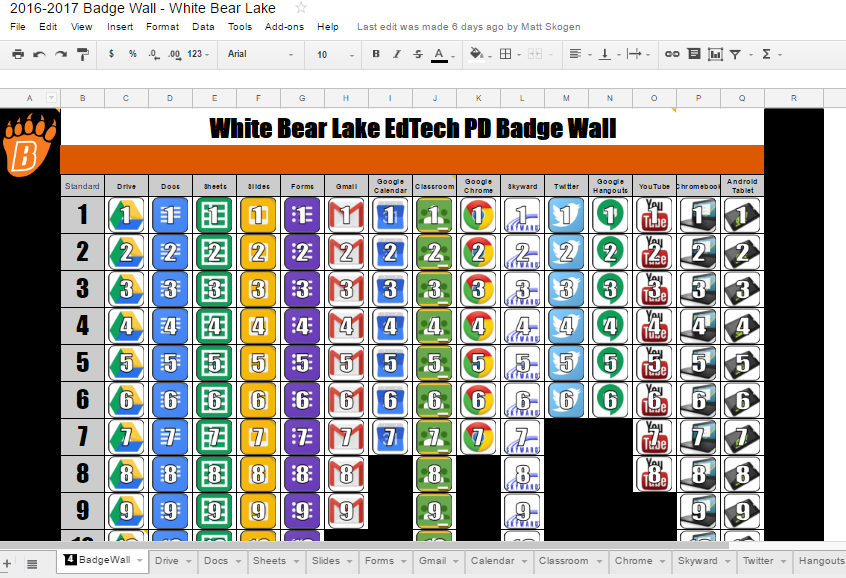
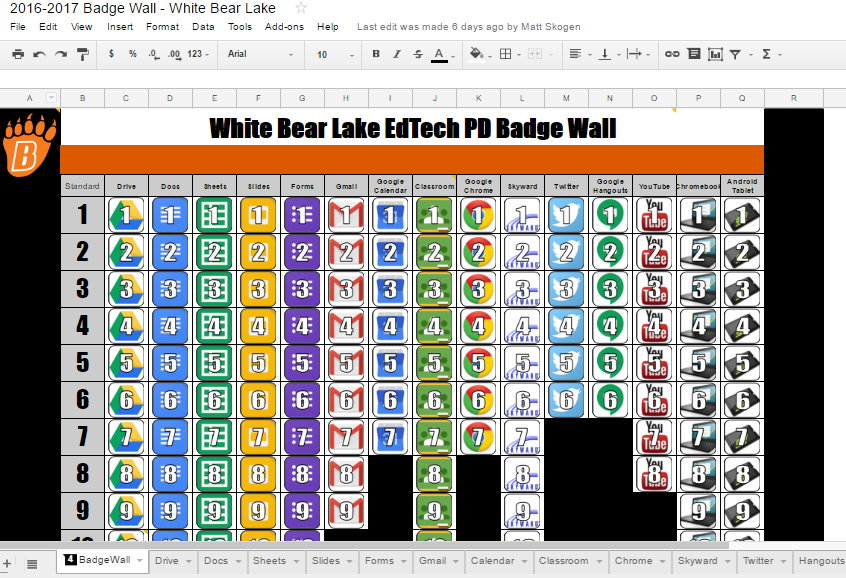
WBL EdTech PD Badge Wall

We will be re-opening up the badge wall this summer from June 12th-August 25th for anyone who would like to get started and for those of you who have already begun. Join the Google Classroom to get going with this self-paced PD.

Revisit this blog post for more information about this opportunity.

For those of you who are just starting: We will not be offering "partial credit" for this summer's badge wall meaning you will need to complete the entire wall to earn hours. You can sign up for the 15 hours in PD Express.

If you want CEUs you must sign-up in PD Express. If you don't sign up, you will not receive credit.


Please contact your Digital Learning Specialist if you would like additional information on anything mentioned above.

Tuesday, May 23, 2017

Summer PD Opportunities

White Bear Lake EdTech PD Badge Wall

We will be re-opening up the badge wall this summer from June 12th-August 25th for anyone who would like to get started and for those of you who have already begun. Join the Google Classroom to get going with this self-paced PD.


Revisit this blog post for more information about this opportunity.
For those of you who have already started: You can still sign up for individual hours for each tool you have already completed in PD Express, but you must do so by May 30th. 
For those of you who are just starting: We will not be offering "partial credit" for this summer's badge wall meaning you will need to complete the entire wall to earn hours. You can sign up for the 15 hours in PD Express.

A couple of very important notes:
If you want CEUs you must sign up in PD Express. If you don't sign up, you will not receive credit. 

White Bear Lake Summer Tech Camp
Mark your calendar for Wednesday, August 23rd for Summer Tech Camp. This year we will be providing a Google Educator Level 1 Certification Boot Camp and a Google Educator Level 2 Certification Boot Camp. These certifications provide you with the necessary skills to use the suite of Google products effectively and efficiently in your classroom. More details will come soon, so stay tuned!

Tuesday, May 16, 2017

Custom Homepages in Chrome + ClassroomScreen + WBL Badge Wall

Custom Homepages in Chrome

You may find yourself navigating to the same webpage every time that you log into your computer. To save time, you can set these pages to automatically open when you start Chrome. Some sites that you may want to open right away are Classlink and the district homepage.

Start by clicking on the three dots in the top right corner of Google Chrome. 

Select 'Settings' from the menu and then 'Show advanced settings' at the bottom of the window.

In the section titled 'On startup', select 'Open a specific set of pages' and then 'Set pages'.
Finally, copy and paste the URL of the webpage that you would like to open automatically when you start Chrome. You can add more than one. After you click 'OK', close Chrome and then open it again. The webpage you just saved should be the first thing that pops up!

ClassroomScreen

Teachers in the classroom rely on many different tools to facilitate learning. Unfortunately, many of these tools are spread out across many websites and devices. If you ever find yourself scrambling to remember the name of that one timer website or can't find the link to your favorite digital whiteboard, check out www.classroomscreen.com

ClassroomScreen is a blank canvas with many tools at your disposal. You can access any of these tools with the click of a button.


The windows can easily be rearranged. When you no longer need a tool, click on the red 'X' in the toolbar. It couldn't be more simple. Try it out!

Technology Badge Wall

A reminder that the cutoff for completing the Badge Wall is tomorrow, May 17th. People who have completed their wall will receive a certificate and sticker in the coming weeks. Of course, you can continue exploring and learning on your own if you haven't completed the challenge yet. Thank you for joining us on this adventure! Stay tuned for future challenges and events.