Search This Blog

Tuesday, September 26, 2017

New Slides Video Options + Flippity


New Video Options in Google Slides

1. Insert videos from Drive: You can now insert videos in Slides directly from your Google Drive!
  • Click "Insert" and select "Video."
  •  Click "Google Drive."
  • Choose a video from your Drive.
2. Select start and stop times: You can now choose when to start and stop videos inserted in slides!
  • Choose "Video Options" by clicking on the video and then clicking "Video Options" from the menu along the top.
  • or choose "Video Options" by right clicking on the video and then clicking "Video Options" from the menu that displays.  
  • Use the options on the right to select start and stop times. 

Flippity!
This app works with Google Sheets and allows teachers to create classroom activities such as Jeopardy-style games, memory games, bingo games, and more.


Visit flippity.net and click on "Demo, "Instructions," or "Template" to get started.


Monday, September 18, 2017

The Badgewall is Back + InsertLearning

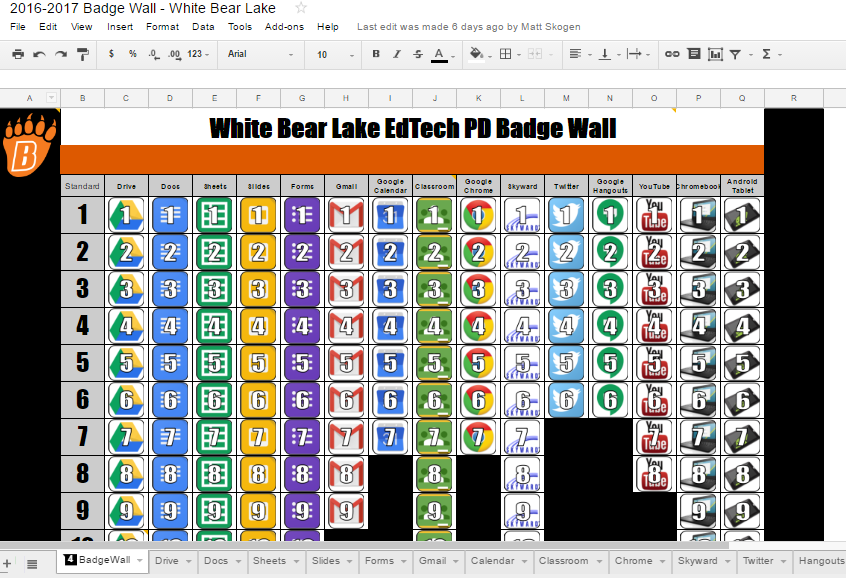
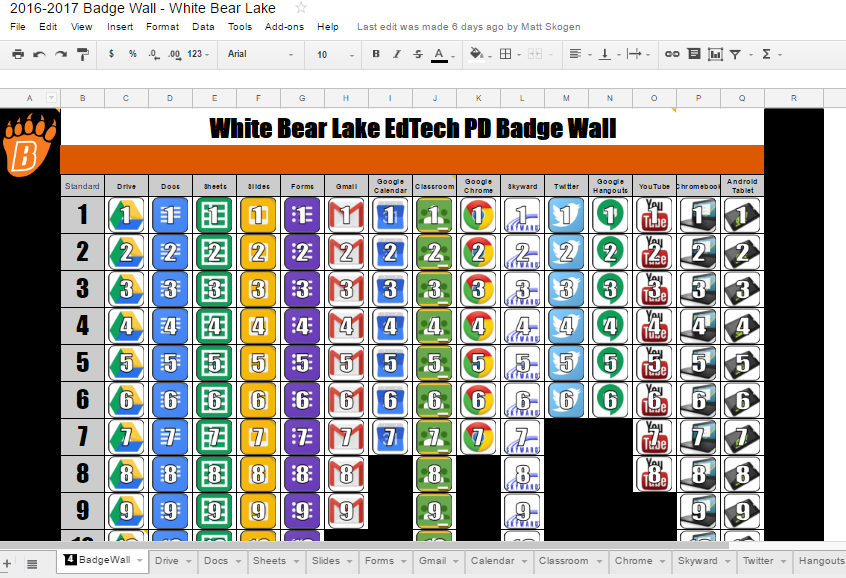
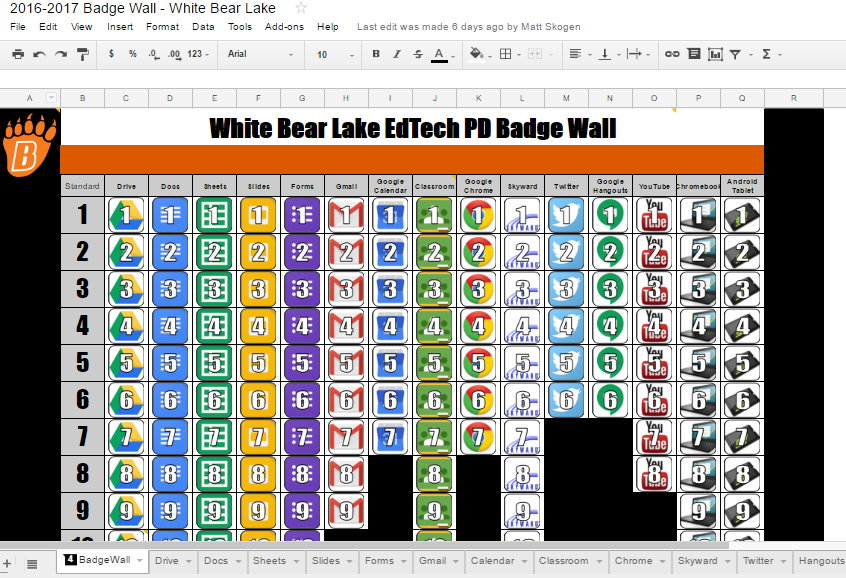
WBL EdTech Badge Wall


The Badge Wall is back!  Impress your colleagues and students by becoming proficient with ed tech tools such as the Google Suite, YouTube, and Twitter. You also will earn a snazzy looking certificate to display proudly in your classroom to demonstrate your awesomeness!

15 PD hours will be given upon completion of the entire wall, but you must sign-up in PD Express. If you don't sign up, you will not receive credit.
If you started last year your progress is saved. Now is the time for you to finish up.

Join the Google Classroom to get going with this self-paced PD. Directions are below.

  1. Join Google Classroom using the code 27v8eib
  2. Click “Open” on the White Bear Lake EdTech Badge Wall assignment to get your own copy of the digital badge wall.
  3. Click on one of the tools along the bottom of the digital badge wall. Work through the challenges at your own pace. There are links to videos that will explain how to do each task. When you complete a task, put an “X” in the “Check off with an X” column to earn your badge. If you already know how to do a task, skip the tutorials and mark it with an “X”.
  4. Click the “Turn In” button when you have completed each challenge by.

Free InsertLearning Subscription

InsertLearning is a Google Chrome extension that lets you turn websites into interactive lessons. Once installed it gives students a toolbar that allows students to highlight and annotate, but also allows teachers to embed multiple choice and discussion questions right into any website.

It was started three years ago by a couple of teachers at a small ALC next to Jethros Char-House in Mahtomedi. This year (and next year) they are giving a free subscription to ALL White Bear Lake educators.

Once you sign up, you’ll automatically be upgraded from the free trial to a full subscription.

Check out their help center, and YouTube channel to learn more

Please contact your Digital Learning Specialist if you would like additional information on anything mentioned above.


Monday, September 11, 2017

Classlink, Google Expedition Kit


Classlink


Classlink is a single sign-on tool. It allows teachers, students, parents, and staff the ability to sign into the Classlink portal and have access to all district digital tools without having to use other usernames and passwords.


Sign in
  • Go to any web browser and go to:  https://launchpad.classlink.com/isd624
    • There are are also Classlink mobile apps for iPhones or Android phones
    • QR code sign ons are available for our K-1 students.  Your DLS will be distributing the badges for single sign on this week.
    • Introduction to Classlink Video.


Security
  • Change your Google password before using Classlink because if anyone has your current password they will have access to EVERYTHING on Classlink; including Skyward student & your employment data!  
  • Students- You must close your chromebook when you walk away.  If left open and unattended, others could get into all of your school apps..  Keep your information safe, never share your passwords with other students.  
  • Teachers- You must lock your desktop, laptop or Chromebook to sleep to initiate password security whenever you step away from your teaching device.  With the advantages of Classlink also comes the possibility of somebody being able to access ALL of your information in one spot. Be mindful of this whenever you leave a device unattended.
How to lock your devices

  • Desktop- Ctrl+Alt+Delete
  • Laptop - close cover
  • Chromebook- close cover

Parent Classlink

  • Classlink for Parents will be sent home in the next week.  Parents will be able to access Skyward, FeePay, etc. with one log in.  


Bring your class on a virtual field trip with Google Expeditions


We have exciting news! Our district owns a classroom set of Google Expeditions devices and viewers. This kit includes 36 viewers, 36 mobile devices, a router, and an Android tablet for the teacher to lead the Expedition.
Expeditions .jpeg


What is a Google Expedition? It is a virtual reality teaching tool that lets you lead immersive virtual trips all over the world — get up close with historical landmarks, dive underwater with sharks, even visit outer space! Click here to see the list of over 600 expeditions available.

A Google calendar has been created dividing up the year by buildings. Please note when the Kit will be at your building and contact your digital learning specialist to reserve a specific time during that week.  


Tuesday, August 29, 2017

White Bear Lake Innovation Spotlight.


Today's classrooms look eerily similar to the classrooms that I experienced in my own K-12 education. That's not bad per se. I mean, I know a lot of great people that are products of the traditional, factory-style, approach to teaching. This model is tremendously successful at preparing workers for an industrialized society. 

By and large, today's educational workforce are products of the industrial style of education. We teach learners how we were taught and we don't know what we don't know.

The rub, for me, is that our world has enough adults that show up on time, tie a Double Windsor, and color inside the lines. That doesn't cut it, anymore. We require world changers. Young people that are creative, gritty, well spoken, critical thinkers, innovators, and problem solvers. An approach to teaching that is direct-instruction-centric, with assessment valuing regurgitation of googleable facts, will fall short of our ideals. If we continue to teach the way that we have always taught, then we can expect the same results that we have always got.

What does it mean to equip students to be future ready? In the name of overused clichés, take inspiration from the immortal words of Walter Gretzky, as passed on to the world through his son Wayne: “Skate to where the puck is going, not where it has been.”

If you accept that education would benefit from a makeover, then how do we promote change? Dean Shareski, insightful educational thinker, thought that investing equal parts promoting ideas with highlighting innovation that is happening would be a good start. 

Our district is filled with innovative people, spaces, and ideas. The innovation spotlight highlights innovation worthy of replication.

The first installment showcases Michael 'Mick' McCollough using a Google Forms, Google Docs, and a Google Sheets add-on, AutoCrat, to efficiently create a behavior and effort self-assessment for students used to drive conversations at parent-teacher conferences. 

The first installment showcases Michael 'Mick' McCollough using a Google Forms, Google Docs, and a Google Sheets add-on, AutoCrat, to efficiently create a behavior and effort self-assessment for students used to drive conversations at parent-teacher conferences.

My next effort highlights Amanda Vernon and the innovative process that Amanda uses to prioritize content mastery in her math class. Her students were so focused on points that they seemingly forgot about the learning. Instead of using homework completion to determine grades, she assessed on whether students could tangibly demonstrate understanding.

https://create.piktochart.com/output/18595835-innovation-spotlight-vernon

Tuesday, June 6, 2017

Summer Tech Camp Information

save image
This year’s Summer Tech Camp will be hosted on Wednesday, August 23rd from 8:00 AM-4:00 PM at District Center.

Choose from one of our Google Certified Educator Bootcamps or classes to zero in on implementing the 4 C’s within your teaching. There are 4 options in all, and free childcare is available.

Details of the different options and the link to register can be found by clicking here.  The deadline to register is August 1st. We hope to see you there!

WBL EdTech PD Badge Wall

We will be re-opening up the badge wall this summer from June 12th-August 25th for anyone who would like to get started and for those of you who have already begun. Join the Google Classroom to get going with this self-paced PD.

Revisit this blog post for more information about this opportunity.

For those of you who are just starting: We will not be offering "partial credit" for this summer's badge wall meaning you will need to complete the entire wall to earn hours. You can sign up for the 15 hours in PD Express.

If you want CEUs you must sign-up in PD Express. If you don't sign up, you will not receive credit.


Please contact your Digital Learning Specialist if you would like additional information on anything mentioned above.

Tuesday, May 23, 2017

Summer PD Opportunities

White Bear Lake EdTech PD Badge Wall

We will be re-opening up the badge wall this summer from June 12th-August 25th for anyone who would like to get started and for those of you who have already begun. Join the Google Classroom to get going with this self-paced PD.


Revisit this blog post for more information about this opportunity.
For those of you who have already started: You can still sign up for individual hours for each tool you have already completed in PD Express, but you must do so by May 30th. 
For those of you who are just starting: We will not be offering "partial credit" for this summer's badge wall meaning you will need to complete the entire wall to earn hours. You can sign up for the 15 hours in PD Express.

A couple of very important notes:
If you want CEUs you must sign up in PD Express. If you don't sign up, you will not receive credit. 

White Bear Lake Summer Tech Camp
Mark your calendar for Wednesday, August 23rd for Summer Tech Camp. This year we will be providing a Google Educator Level 1 Certification Boot Camp and a Google Educator Level 2 Certification Boot Camp. These certifications provide you with the necessary skills to use the suite of Google products effectively and efficiently in your classroom. More details will come soon, so stay tuned!